Monday, December 17, 2012

Apple iPhone 5 - No contract from Apple

Fan of Apple products - iPhone 5 now is available in Malaysia in Apple Online store.

Available in Black & Silver OR White & Silver in the following size:-
16GB - RM 2199
32GB - RM2499
64GB - RM2799


Sunday, January 15, 2012

iPhone user (except iPhone4S) .. Jailbreak now before exploit patch

iOS users might get a rejoice weeks ago, however, with the latest rumours circulating around, Apple released 5.1 Beta patched for the exploit use in the jailbreak method, source here.

If you wish to jailbreak your iPhone, recommend to perform the upgrade now.

To jailbreak your iOS, the untethered jailbreak released pod2g , details of instruction here. Excerpt here for your convinience:-
Step 1: Download Redsn0w 0.9.10b3 for Windows from this link and Redsn0w 0.9.10b3 for Mac from this link and save the application in a folder named "Redsn0w" on your desktop.
Step 2: Double click the Redsn0w zip file and extract the application to the Redsn0w folder. Navigate back to the Redsn0w folder and launch the Redsn0w application.
Step 3: After launching Redsn0w, click on the Jailbreak button.
Windows 7 users should run the exe in Windows XP compatibility mode (right-click on the Redsn0w exe and select Properties, then select the Compatibility tab and select Run this program in compatibility mode for Windows XP). Windows XP and Windows 7 users should run Redsn0w as‘Administrator’ (right-click on the Redsn0w exe and select 'Run as an Administrator').
Step 4: You will now be prompted plug your iPhone to the computer and switch it OFF. Follow the instructions and click on 'Next' to move to the next screen:
Step 5: You will now need to put your iPhone into the DFU mode. Redsn0w will take you through the necessary steps:
(a) Hold the Power button on iPhone down for 3 seconds:
(b) Now simultaneously hold the Home button and keep the two buttons pressed for 10 seconds:
(c) Now release the Power button while keeping the Home button pressed until Redsn0w detects the device:
Step 6: Your iPhone should reboot now. Please remember to release the Home button.
Step 7: Redsn0w will now start preparing the jailbreak data.
Step 8: You will now be prompted to select the jailbreak options you would like. Make sure Cydia is selected and select 'Next' to continue.
Step 9: You iPhone will be rebooted again and Redsn0w will now begin uploading the new RAM disk and kernel.
Step 10: You will now be notified once the jailbreaking process is complete. Click on the 'Finish' button to exit the application.
Step 11: Your iPhone will reboot once again (which could take approximately 5 minutes). After it has rebooted, your iPhone should be successfully jailbroken. You should find Cydia jailbreak app on your iPhone’s home screen.
If you're new to the jailbreaking world and wondering what to do after jailbreaking your iPhone, checkout our jailbreak apps category page to find out the apps you can install on your iPhone using the Cydia app. Please note that some of the jailbreak apps and tweaks are still not compatible with iOS 5/iOS 5.0.1 so please be cautious while installing them 

Thursday, January 12, 2012

Mobile Security - iOS versus Android Infographic

Pictures says it all.....The infographic examines the security features of Android and iOS, and also takes a look at their strengths and weaknesses.

Android vs iOS infographic
Infographic by Veracode Application Security

Thursday, January 5, 2012

Android OS Platform - Gingerbread & ICS on the rise

On November, we highlighted that Android Gingerbread (2.3.3) dominates the Android OS platform.

Source:- Android Developer
Today (as of January 3, 2012)  Android analysis platform report:-


  • Android 2.3.x dominating 55.5% (On November 3, 44.4%)
  • Android 2.2 now dominating 30.4% (On November 3, 40.7%)
  • New Introduction - Android 4.0.x now dominating 0.6%

Source:- Android Developer

At of writing, only Galaxy Nexus comes default with Android 4.0.x. While Android ecosystem has been seems as "most" open platform operating system  however, getting official update will likely to depends on the OEM interest and strategies of (if OEM not releasing any official update) independent custom ROM build.

Whether will earlier devices will get upgrade to ICS soon? Or new device will launch with default Android 4.0.x OS? 

We are unsure on the roadmap or strategies ahead. If you are looking for a purchase right now and yet can't wait for the Galaxy Nexus to be available locally, this article (Link) provide a comprehensive list of eligibility & availability dates.


Saturday, December 24, 2011

Merry Christmas & Happy New Year 2012

Wishing our readers Merry Christmas & Happy New Year 2012


Get iTunes notification pop up in dock (10.7)

Application on MAC OS X 10.7 (Lion) 


We've never share try this, just to share with readers on the tips & tricks we come across:-


There's a hidden setting for the Dock that will show pop-up notifications of which iTunes track is playing, a little like Growl.

First, quit iTunes if it's open, then open a Terminal window and type the following:

defaults write com.apple.dock itunes-notifications -bool TRUE;killall Dock

Then start iTunes and try playing a track. Neat, eh? The pop-up fades away after a few seconds. To add the iTunes icon to the pop-up window, type the following into a Terminal window:

defaults write com.apple.dock notification-always-show-image -bool TRUE;killall Dock

To deactivate the pop-up at a later date, quit iTunes again, then open a Terminal window and type the following two lines:

defaults delete com.apple.dock itunes-notifications
defaults delete com.apple.dock notification-always-show-image;killall Dock
 
Source:- [MacWorld

Monday, December 12, 2011

Check internet utilization on Maxis & new Internet plans

Update 1 (24 December 2011) :- Latest ussd string to check mobile internet usage ( *100*3*6#)


Unknown to many of us, recently Maxis introduce a method to check your mobile internet utilization from your phone. This will definitely helps for subscriber that been complaining about overcharging from Maxis - as now subscribers can currently monitor their usage daily to ensure quota is not exceeded.

From the FAQ (not sure if this applicable for monthly pass or existing pass ; as it mentioned New Internet Plan):- Maxis seems to send alert when usage is at 80% & 100% of usage.

However for those that eager to find out their utilization, here are the short-cut to check mobile internet usage from ussd menu:- *100*3*5# (execute this from your phone dialler) - found it works with Monthly pass on this

Also little known to us Maxis launch time-based & quota upgrade passes for their subscribers.

The plan as highlighted below:-


Wednesday, December 7, 2011

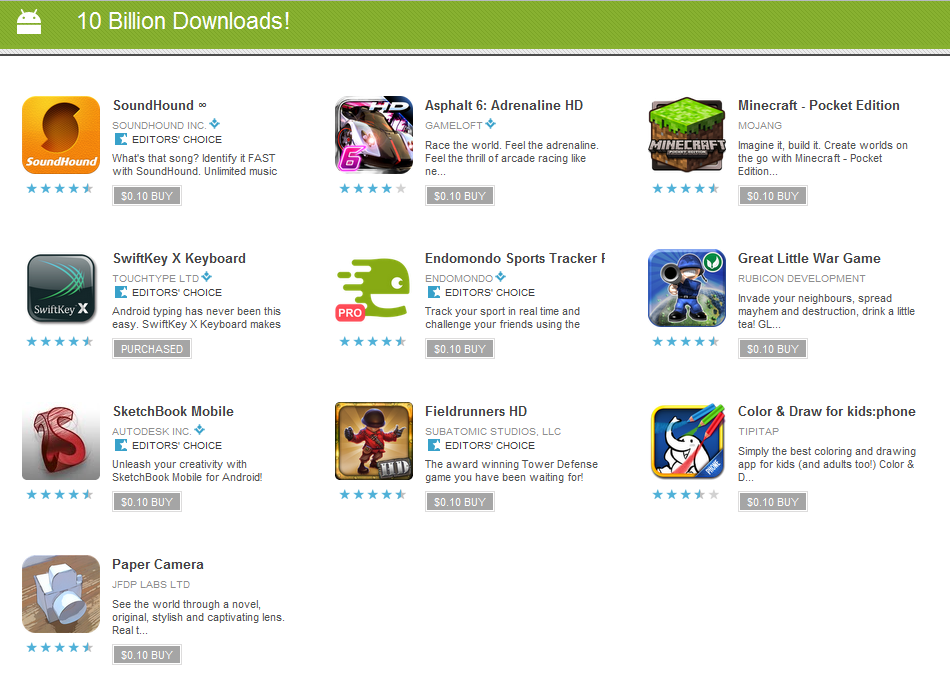
USD 0.10 apps at Android Market

Update 1 (9 December 2011):- Apparently the app will last only for 1 day. Each day Android Market will offer 10 different apps at price of USD 0.10 for 10 days.

For those that interested in using legitimate applications on the Android, here are the chance for you to purchase it.

Google is offering 10 premium apps for USD 0.10 for 10 days.

My personal recommendations will be the SwiftKey X keyboard. Awesome and it does improve my typing accuracy with it predictive learning features.

Android Market

Check network coverage signal with actual number on iphone


Have you encounter a situation when you network call quality or data network is bad/slow at certain area? Counting the bar by moving around might helps you with better signal but it's not really specific. With this tips, you can move around the actual signal bar convert into actual number for your checking.

This does not require the phone be jailbreak, have a try on it (as unsure if it will work with all version of iOS).

Remember:- The closer to zero the stronger the signal of the coverage within the area. Here are the steps:-

Step 1: Dial *3001#12345#* on your iPhone then press Call.
Step 2: You’ll now enter Field Test Mode. You’ll notice a signal strength indicator on the upper left hand corner of your screen. You can toggle between signal strength bars and a number by simply taping on it. At this point, press the home button to exit the app or if you would like the feature to be permanent, continue on. Don’t worry, the process is completely reversible.
Step 3: Hold down on the Power button until you see the ‘slide to power off’ bar.  Do not power off the device.
Step 4: Press down on the Home button until the app closes and you return to your home screen.
That’s it. Even when restarting the iPhone, the signal strength can be toggled between bars and numbers. The closer your number is to zero, the stronger your signal is.


To return to the default bars permanently, follow these steps:
Step 1: Dial *3001#12345#* on your iPhone then press Call.
Step 2: Press on your Home Button once.

The second step essentially closes the Field Test mode. You won’t see it on your iPhone again unless you repeat the process. 

[Source:-Redmond Pie]

Tuesday, November 8, 2011

Android 4.0 - Ice Cream Sandwich

Thinking to upgrade your phone? You are not so into "fruit" product.

Have set your your mind to go for Android, but yet afraid the system being outdated in just few months when Ice Cream Sandwich release and unsure about upgrade eligibility.

Fret not, HTC Facebook have recently announce the first wave of devices getting the Ice Cream Sandwich upgrade eligibility for the following:-


"HTC Sensation, HTC Sensation XL and HTC Sensation XE, as well as the HTC Rezound*, HTC EVO 3D, HTC EVO Design 4G* and HTC Amaze 4G* "


* US Handset

Source: - [HTC Facebook]

Sunday, November 6, 2011

Android Gingerbread - Rules the Android Platforms Version

As of latest reports compiles gather by Android Market, the recent platform domination as of today will be Gingerbread ( 2.3.3 - 2.3.7)


Based on the historical trend data, there seems to be increasing over domination from the earlier popular Froyo (2.2) for the past year.

Source:- [Android Developers]

Thursday, September 29, 2011

Wednesday, July 20, 2011

MAC OS X Lion Launched & New MacBook Air!!!

Apple launched the Mac OS Lion 10.7. The new version is available for download in the Mac App Store for user. Retails for USD 29.99.   [Source: OS X Lion]

Also indicate the launch of new MacBook Air. The new MacBook Air is packed with Intel Core i5 & i7 processor, Thunderbolt, Backlit Keyboard & comes with OS X Lion. [Source: MacBook Air]

Sunday, May 22, 2011

How To Install MFM - Papago Map Into iPhone

As many of you out there know, that maps plays a crucial part of a navigation software. While you can always wait for the official maps provide by Papago, however that would require waiting of another release in the iTunes Store.

If you can't wait / prefer the latest maps to be use for any reason, Malfreemaps (link) have being providing good updated maps. For many other phone, replacing the maps requires only replace a folder/files, but the same cannot be done easily for iphone.

I've stumble across this blog, I've not personally tried this, this blog provide you step-by-step guide of doing so, Talk@Keong: How To Install MFM - Papago Map Into iPhone


Monday, May 2, 2011

Apple Ipad 2 - Malaysia

The long awaited ipad2 is now available in Malaysia - 29 April 2011.

Not sure if this it due to our strengthen ringgit, the entry level is price at RM1499, make it competitive compare to our neighbor country (entry at SGD 668).

Go to the nearest reseller store or make at order at Apple Store

Wednesday, March 16, 2011

Blackberry OS 6 upgrade for Curve 3G and Bold 9700

Blackberry Curve 3G and Bold 9700, rejoice!  Blackberry OS 6 is make available to you know.
Key Features
[Find out more: - More Information]

For upgrade, you could connect your Blackberry phone to your computer and go to http://us.blackberry.com/update/ to obtain the update.

Monday, March 14, 2011

Wi-FI is 30 Percent Slower...


Not happy with your connections speed despite your ISP provider offering you a good bandwidth. Are you using Wi-Fi for your Internet connection? 
The latest research by Epitiro mentioned that based on the million test of 14,000 connections in UK, Spain, Italy and US. On average, WiFi connection were 30% slower than your Ethernet. If you are purely using the WiFi for basic surfing & emails, this drop of connection you might not notice it. If VoIP, video calls, watch TV thru the Web would notice the difference.
Source:[ PC World ]

Friday, February 25, 2011

Manual Update of Nexus One 2.3.3

For those who can't wait for the OTA update to be happen in your Nexus One, here are the manual steps to perform the upgrade:-

1. Download the Nexus One update from this link here.
2. Rename the file to update.zip (If your OS hides file extensions by default, rename the file to update to avoid it being renamed to update.zip.zip)
3. Connect your Nexus One to your computer and transfer the file to the root of the microSD card (inside no folders)
4. Power down the Nexus One. Now reboot it by holding the Power and Volume Down at the same time.
5. You should now see a screen with Androids on skateboards. Using the Volume keys, navigate to Recovery and press Power.
6. The recovery screen will only show a triangle with an exclamation point in it. To get to the recovery menu press Power and Volume Up at the same time. (It can be a bit tricky sometimes, so keep trying if it doesn’t work the first time)
7. Using the trackball, scroll down and select “Apply sdcard:update.zip.” to start the update.
8. Once the update has completed, reboot your Nexus One.
You’ve successfully updated to Android 2.3.3. Enjoy!

Source:- Intomobile

Wednesday, February 23, 2011

Gingerbread (Android 2.3.3) for Nexus One & Nexus S

Google annouced the latest Gingerbread to make available via OTA update. Be patient.....(message from googlenexus twitter).. for few weeks

Monday, January 24, 2011

Hidden Settings for MAC OS X

Interested to uncover the hidden settings of Mac OS X, check this out:- Secrets